
AP PSC login facilitates Andhra Pradesh Public Service aspirants to register, fill application, check status, Admit Card, Result, Answer Keys, Response Sheet, and Check counselling and qualification status. APPSC registration and login can be accessed on the official website i.e. psc.ap.gov.in. To create an APPSC login students must first finish the registration process. APPSC requires an OPTR login at every step to proceed with the candidature.
On APPSC portal requires all the aspirants to use login id and password to access all the exam related elements such as Admit card, Result, Answer key etc.
How to Register for APPSC 2025?
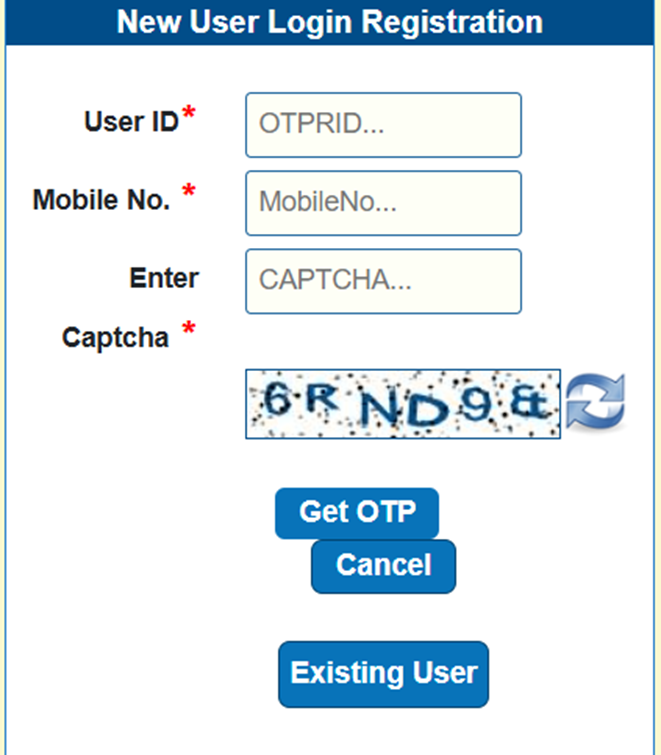
Aspirants must apply online on APPSC official website login portal for APPSC exam. APPSC has one one-time registration login page that allows students not to re-login in every step of their candidature. Candidates can follow the steps below to retrieve their APPSC registration login details.
- Visit the official website of APPSC, i.e.psc.ap.gov.in
- Now, you need to click on “Login” and in the subsequent window select ‘New User?’
- Create the User ID and enter mobile number into the tab. Now enter captcha and click on ‘Get OTP’.
- Here enter the OPT and verify the mobile number. Click on submit to finish the registration process.
APPSC Login 2025: Recover Lost OTPRID
In case you have forgotten your OTPR ID and you are trying to recover the same, you can follow the given steps:
- Browse login page of APPSC and click on ‘OTPR’ to recover your password.
- On the subsequent window, enter the OTPR type, Date of Birth, Mobile Number, Email Id, and Captcha.
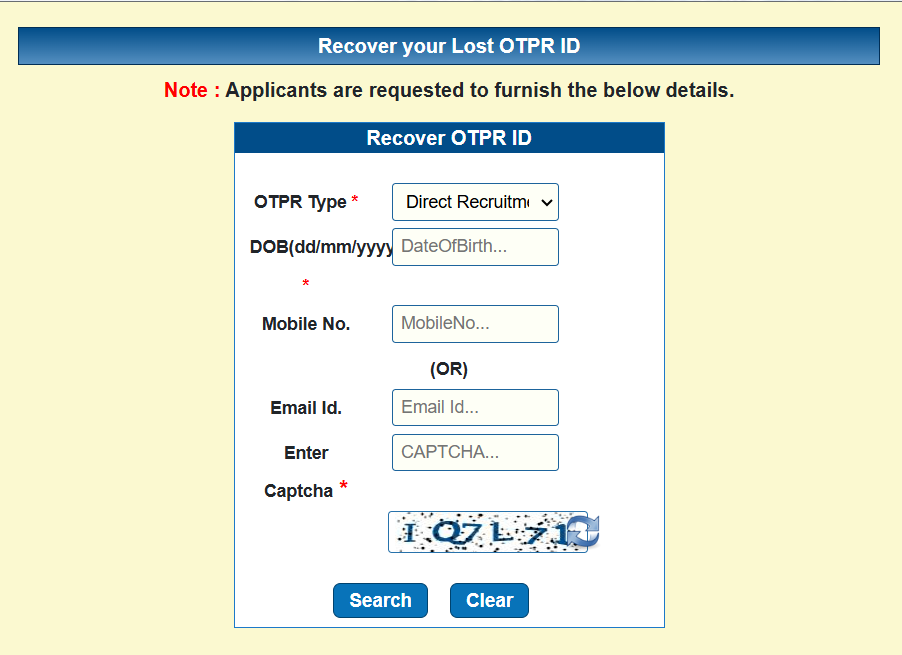
- After submitting the information, your lost OTPR ID will be displayed on the screen. You can now note it down for further usage.
Why create APPSC Login 2025?
APPSC login is the only way to apply for various job vacancies of APPSC. The reasons to register and login on APPSC portal are as follws:
- APPSC login is essential for application and submit the required documents for APPSC registration.
- APPSC login helps applicants to make correction in the application form.
- After APPSC login you can download Admit card, Answer Key and Result.
- The portal also helps to raise any kind of concerns against the answer key.
- Applicants can also apply against any discrepancies in the answer Key.
- Lastly the counselling registrations are also made via this portal.
How to Apply for APPSC 2025?
APPSC requires One Time Profile Registration (OTPR) User ID and password to apply, make corrections, and upload documents on the portal. The step wise process to register for APPSC login are as follows:
- Browse the official website of APPSC exam @psc.ap.gov.in.
- Now click on ‘APPSC Application Form 2024″ online link on APPSC login page.
- Enter Login credentials like User ID & password to login into APPSC. Start the application process by providing the given information and upload all the required documents. Upload a scanned image of your passport-size photo and signature.
- Finally complete the application process by paying the application fee using a credit/debit card and click on the submit button to complete the application process. Save a copy of the submitted form for future use.
How to download APPSC Admit Card?
To download APPSC Admit Card, you must log in to APPSC website using your user ID and password. The steps to download APPSC admit Card are as follows:
- Visit the official website of APPSC and click on ” APPSC ADMIT CARD”.
- Next you need to enter APPSC Login credentials such as User ID, password, and the application number. Click on Submit.
- Once submitted, your APPSC Admit Card will be displayed on the screen. Download it and take to printout to carry the same to the examination hall.
How to Check APPSC Result 2025?
To check APPSC result it’s important to login first using the registered UserID and Password. The steps to check APPSC result are as follows:
- Browse the official website of APPSC and click on “APPSC RESULT 2025” .
- Next you need to enter APPSC Login credentials such as User ID, password, and the application number. Click on Submit.
- After submission your ‘APPSC Results 2025’ will appear on the screen.
Also Read:
APPSC login FAQs
Q. How do I login on the APPSC website?
Ans. To login on APPSC website you need ot visit the official website and enter the registered UserID and Password. Then enter the captcha as displayed on the screen and submit to login.
Q. IS APPSC Group 4 conducted every year?
Ans. Yes, APPSC Group4 is conducted annually. The notification for all the vacancies under group 4 of APPSC are displayed on the APPSC official website.
Q. What is the Zone 1 and Zone 2 in APPSC?
Ans. As per the APPSC the Zone 1 cities are Srikakulam, Visakhapatnam and Vizianagaram. (SKM, VSP, VZM) and Zone 2 cities are East Godavari, West Godavari and Krishna.
Q. What is the application fees for APPSC Group2?
Ans. The registration fees for APPSC Group 2 are INR 250 and candidates are required to pay an additional fee of INR 80 in case of UR Candidates.
Q. What are the uses of APPSC Login?
Ans. AP PSC login facilitates Andhra Pradesh Public Service aspirants to register, fill application, check status, Admit Card, Result, Answer Keys, Response Sheet, and Check counselling and qualification status.

He is a passionate blogger with 15 years of experience in creating engaging, SEO-friendly content. He loves sharing insights, tips, and stories that inform and inspire readers around the world