
MHT CET Login 2025 is the dedicated portal for candidates appearing for the Maharashtra Common Entrance Test (MHT CET). Through this login, applicants can access their application form, download admit cards, check results, and participate in the counseling process. It requires a valid application number and password created during registration.
You may also check the important dates of MHT CET 2025 exam in the following section:
MHT CET Login 2025: Important Dates
Check out the table below for the important dates for MHT CET 2025:
| Events | MHT CET 2025 Dates |
| MHT CET 2025 Application Begins | December 30, 2024 – February 15, 2025 |
| MHT CET 2025 Application Ends | February 16, 2025 – February 22, 2025 |
| MHT CET 2025 Exam for PCB Group | April 09, 2025 – April 17, 2025 |
| MHT CET 2025 Exam for PCM Group | April 19, 2025 – April 27, 2025 |
| MHT CET 2025 Answer Key | May 2025 |
| MHT CET 2025 Result | June 2025 |
MHT CET Login 2025: Where to Use It?
MHT CET login can be used for the following purposes:
- MHT CET 2025 registration
- MHT CET 2025 application form filling
- MHT CET 2025 admit card download
- MHT CET 2025 answer key download
- MHT CET 2025 result check
MHT CET Login 2025: Registration Process
The MHT CET 2025 registration has already started on the official website. Before filling out the online application form, you must complete the MHT CET registration process. Follow these steps to register for the MH-CET Exam 2025-26:
- Step 1: Visit the official website at cetcell.mahacet.org.
- Step 2: Select the “CET (Examination) portal for AY 2025-26” option.
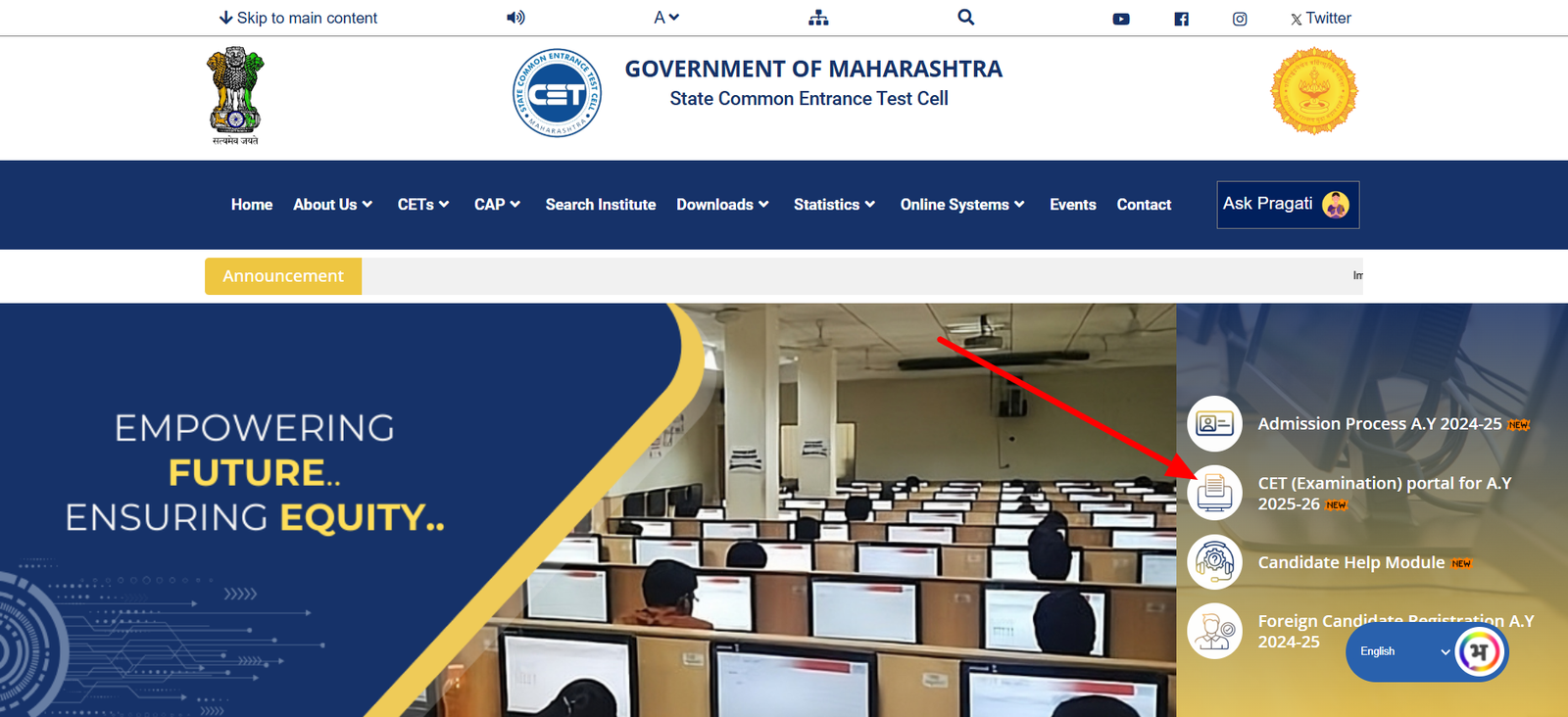
- Step 3: Existing users can simply log in to their account, while the new users can register themselves.
- Step 4: If you are a new user, then select the “Register” option.
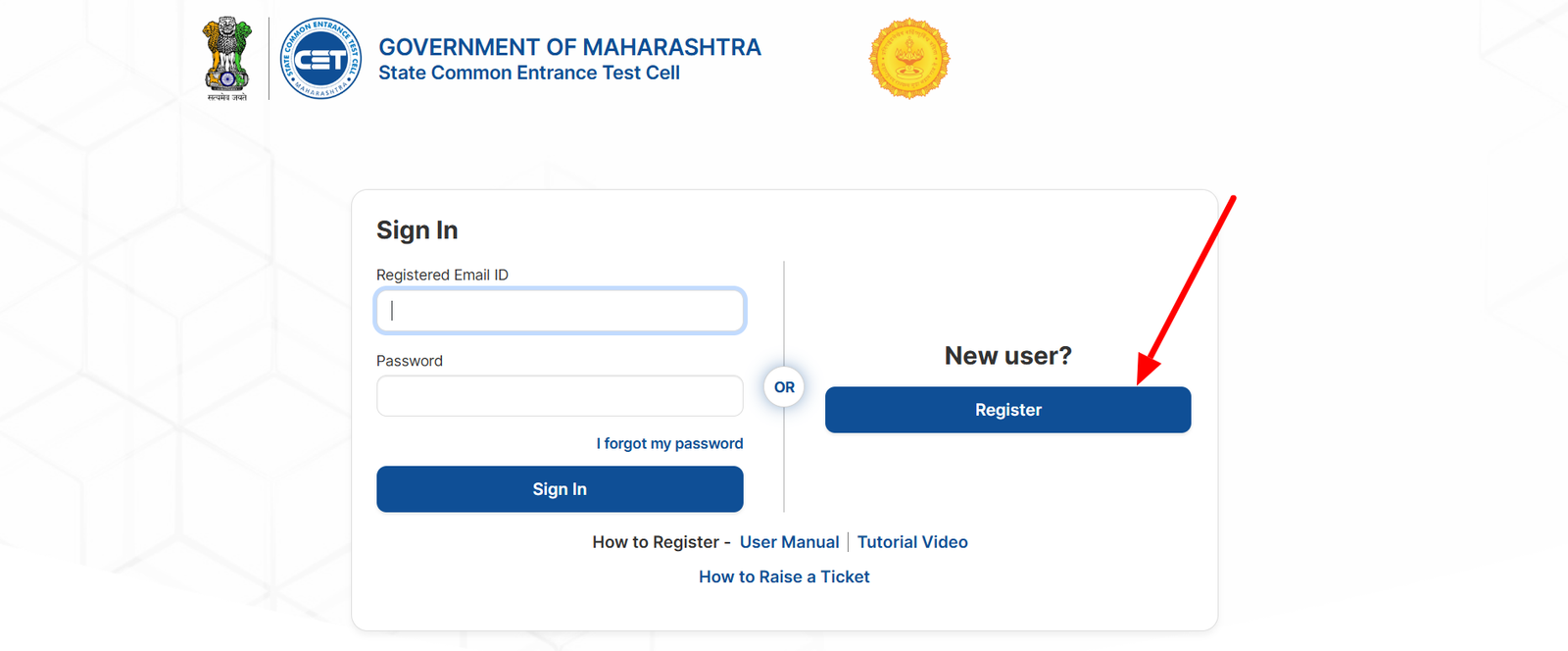
- Step 5: Select the “First Name & Middle Name” field & enter input.
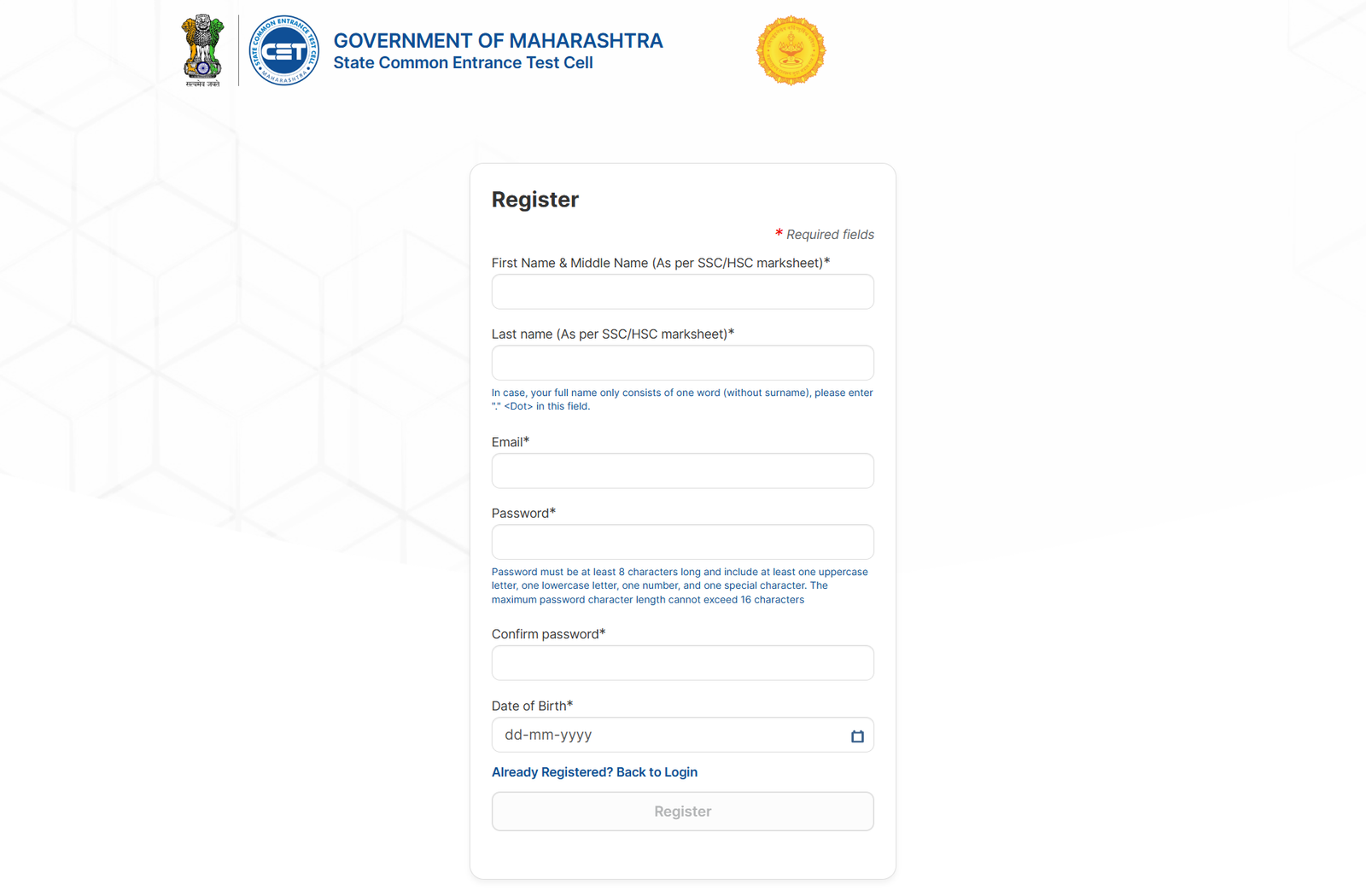
- Step 6: Click on the “Email” field and enter the input.
- Step 7: Select the “Password” field and enter the input as per the guidelines.
- Step 8: Select the “Confirm Password” and enter the same input as the password field.
- Step 9: Select the “Mobile Number” field and enter the input.
- Step 10: Click on the “Date of Birth” field and select the input.
- Step 11: After filling out the registration form, click on the “Register” button.
- Step 12: Then, a verification email will be sent to your entered email.
- Step 13: Open the email and click on the “Verify Email” option.
- Step 14: After verifying the email, you can log in to the system.
MHT CET Login 2025: Create a User Profile
Before filling out the application form, you must have to create a user profile. These details will be used to prefill the data required for online examination submission. To apply for MHT CET 2025, you need to follow the steps below:
- Step 1: Visit the official website at cetcell.mahacet.org.
- Step 2: You have to select the “CET (Examination) portal for A.Y 2025-26”.
- Step 3: Provide your MHT CET 2025 login credentials on the given fields.
- Step 4: After entering the login credentials, select the “Sign In” option.
- Step 5: On successful login, a user information form will be opened and you have to fill in all the details.
- Step 6: Click on the “Father’s Name (First Name Only)” and enter the input.
- Step 7: Select the “Mother’s Name (First Name Only” and enter the input.
- Step 8: Click “Gender” and select the input from the list.
- Step 9: Select the “Religion” field and select the input from the list.
- Step 10: Click on the “Mother Tongue” field and select input.
- Step 11: Click the “Nationality” option and select the input.
- Step 12: Select the annual family income from the list.
- Step 13: Click on the “Marital Status” field and select the input.
- Step 14: You have to provide your complete address in the given fields.
- Step 15: Click on the “Phone No./Mobile No.” field and enter input.
- Step 16: If the permanent address is the same as communication, select the checkbox.
- Step 17: Select the domicile of Maharashtra as Yes or No from the list.
- Step 18: In this step, you have to provide your academic details.
- Step 19: After that, you need to select the “Save Changes” option.
On successful submission, your registration process will be completed and will be navigated to the candidate’s dashboard. The MHT CET dashboard will contain various options such as Registration, Edit Profile, Help Desk, Hall Ticket, etc.
MHT CET Login 2025: Application Form
If you have completed the registration, then you will be able to fill out the MHT CET 2025 application form. In order to apply for the MHT CET 2025, you must follow the steps below:
- Step 1: Visit the official website at cetcell.mahacet.org.
- Step 2: Click on the “CET (Examination) portal for A.Y. 2025-26” option.
- Step 3: Log in to your account with the MHT CET 2025 login credentials.
- Step 4: From the dashboard, click on the “CET Registration” tab.
- Step 5: Active exams will appear and be clickable, while others will be greyed out.
- Step 6: Select the “MHT-CET 2025” and it will navigate to the exam’s application page.
- Step 7: Read the agreements and select the “I Accept and Proceed” option.
- Step 8: Most of the data will be pre-filled in the application form and other items have to be filled.
- Step 9: After filling out the application form, click on “Save & Proceed”.
- Step 10: Pay the corresponding application form fee online and wait for the payment confirmation.
- Step 11: On successful payment, the status of the application form TAB will get updated to “Enrolled” in green color.
MHT CET Login 2025: Password Reset Instruction
If you forgot or lost the MHT CET 2025 login password, then follow these steps to reset it:
- Step 1: Visit the official website at cetcell.mahacet.org.
- Step 2: You just need to select the “CET (Examination) portal for A.Y 2025-26”.
- Step 3: Select the “I forgot my password” option from the login field.
- Step 4: Provide your email on the given field and select “Submit”.
- Step 5: Password reset instructions will be sent to your registered email.
MHT CET Login 2025: Form Correction
All your information which is being filled in the Candidate Profile, when you begin the registration will be auto-populated in the application form. This information will appear as non-editable fields in the registration form. In case, you want to change those details, you have to follow these steps:
- Step 1: Go to the website of MHT CET at cetcell.mahacet.org.
- Step 2: Log in to your account with the MHT CET 2025 login credentials.
- Step 3: You have to select the “Profile” option.
- Step 4: Make all the necessary changes and select the “Save Changes” option.
- Step 5: Re-open the registration form for a particular course and updated information will be reflected there.
Important Note: There are a few details, that you cannot change: Candidate Name, Date of Birth, Email ID, and Mobile Number. In case, if you make any mistakes while filling out these details, you have to raise a ticket on the helpdesk module.
MHT CET Login 2025: Admit Card Download
The MHT CET 2025 admit card will be published around 1 week prior to the scheduled exam date. You will be able to download the admit card or hall ticket online from the official website. To download the admit card, you have to log in to your account with the MHT CET 2025 login credentials. These are the steps that you have to follow to download the MHT CET 2025 admit card:
- Step 1: Visit the official website at cetcell.mahacet.org.
- Step 2: Log in to your account with the MHT CET 2025 login credentials.
- Step 3: Select the Hall Ticket or Admit Card option.
- Step 4: Download the hall ticket/admit card and take a printout.
MHT CET Login 2025: Answer Key Download
The MHT CET 2025 answer key will be released by the Maharashtra CET Cell a few days after the exam. You can download the answer key to your MHT CET exam from the official website. These are the steps through which you can download the MHT CET 2025 answer key:
- Step 1: Log in to your account with the MHT CET 2025 login credentials.
- Step 2: From there, you will get to download the MHT CET 2025 answer key.
- Step 3: You can download the MHT CET answer key in the form of a PDF.
MHT CET Login 2025: Download Score Card
It is expected that the CET cell will be released the MHT CET 2025 result in June. The result download link will be available on the official website of Maharashtra CET Cell. If you appear for the exam, then you can check your result online at cetcell.mahacet.org. To check the MHT CET 2025 result, you must log in to your account with the login credentials. Here are the steps that you have to follow to download the MHT CET 2025 scorecard:
- Step 1: Go to the MHT CET website at cetcell.mahacet.org.
- Step 2: Log in to your account with the MHT CET 2025 login credentials.
- Step 3: Click on the “Score Card” option.
- Step 4: The MHT CET 2025 result will be displayed on the screen.
- Step 5: Download and take a print of the MHT CET result for future reference.
FAQs – MHT CET Login 2025
Q: How do I log in to my MHT CET 2025 account?
Ans: You need to visit the official MHT CET website and click on the login link. Enter your application number and password to access your account.
Q: What should I do if I forget my MHT CET login password?
Ans: If you forget your password, click on the “Forgot Password” link on the login page. You’ll need to verify your identity using your registered mobile number or email to reset it.
Q: Why is my MHT CET login not working?
Ans: This could be due to incorrect credentials, an inactive account, or server issues. Make sure your login details are correct and try again later if necessary.
Q: Can I change my MHT CET login details after registration?
Ans: While your application number is fixed, you can reset your password at any time using the recovery option. Make sure to keep your new credentials safe for future access.
Q: Is login required after submitting the MHT CET application form?
Ans: Yes, you’ll need to log in regularly to download the admit card, check exam updates, view your results, and take part in the counseling process.

He is a passionate blogger with 15 years of experience in creating engaging, SEO-friendly content. He loves sharing insights, tips, and stories that inform and inspire readers around the world