
The NIOS (National Institute of Open Schooling) is an education board that offers class 10th, 12th, and vocational courses in distance mode. The board is managed and controlled by the Indian government. The National Institute of Open Schooling gives every student with an enrollment number and a reference number at the time of admission. Using these credentials, you can track your course of action as a part of NIOS student. On the NIOS Login portal, you can check the status of your study material, exams, practical examinations, and anything and everything related to your education at NIOS. So, it’s very important to understand how you can perform various operations on the NIOS portal.
Benefits of the NIOS Login Portal
There are various benefits of the NIOS login portal:
- You can select subjects and programs that suit your interests.
- This portal provides an opportunity for those students who couldn’t complete their schooling because of various reasons.
- You can transfer credits from other boards, which makes it easier to continue your education without starting over.
- This portal provides a range of courses, such as secondary, senior secondary, vocational education, and life enrichment programs.
How to Access NIOS Login Portal?
To access the NIOS student account, you will need your registered login credentials. You can log in on the NIOS portal using the username/ email or using reference number and enrollment number. You can access the NIOS login portal, just by following the steps below:
- Visit the NIOS login page at sdmis.nios.ac.in/auth.
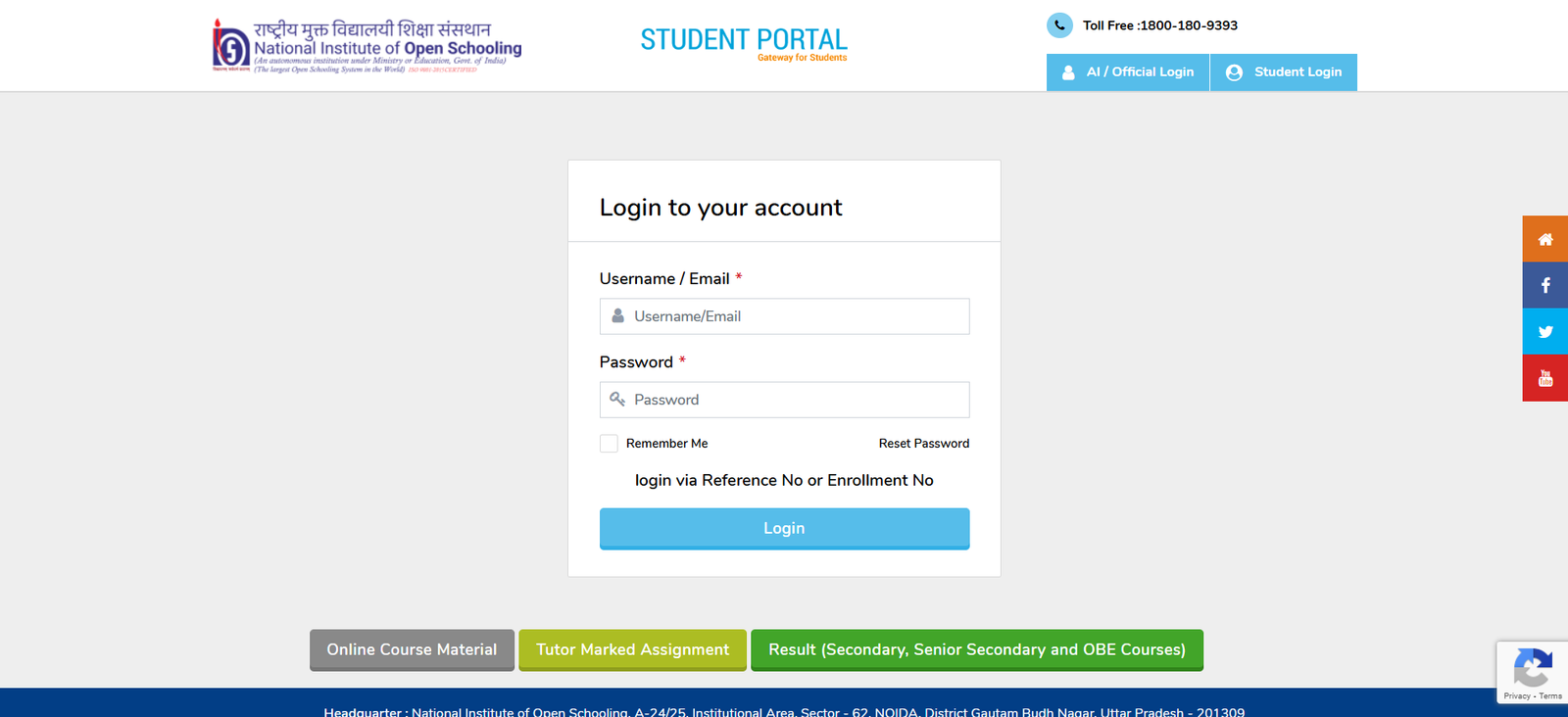
- If you wish to login via username/ Email, enter your username and password.
- You can also apply using the reference number and enrollment number. In this case, you need to either enter the reference number or enter the enrollment number and date of birth.
- Then, you have to select the “Login” button to access the student account.
How to Reset the NIOS Login Password?
In case you have forgotten or lost the password of your NIOS password, the institute provides you with the facility to ‘Reset’ it. This NIOS reset Password process consists of the following steps:
- Visit the NIOS login page at sdmis.nios.ac.in/auth.
- There, right under the login field, you have to select the “Reset Password” option.
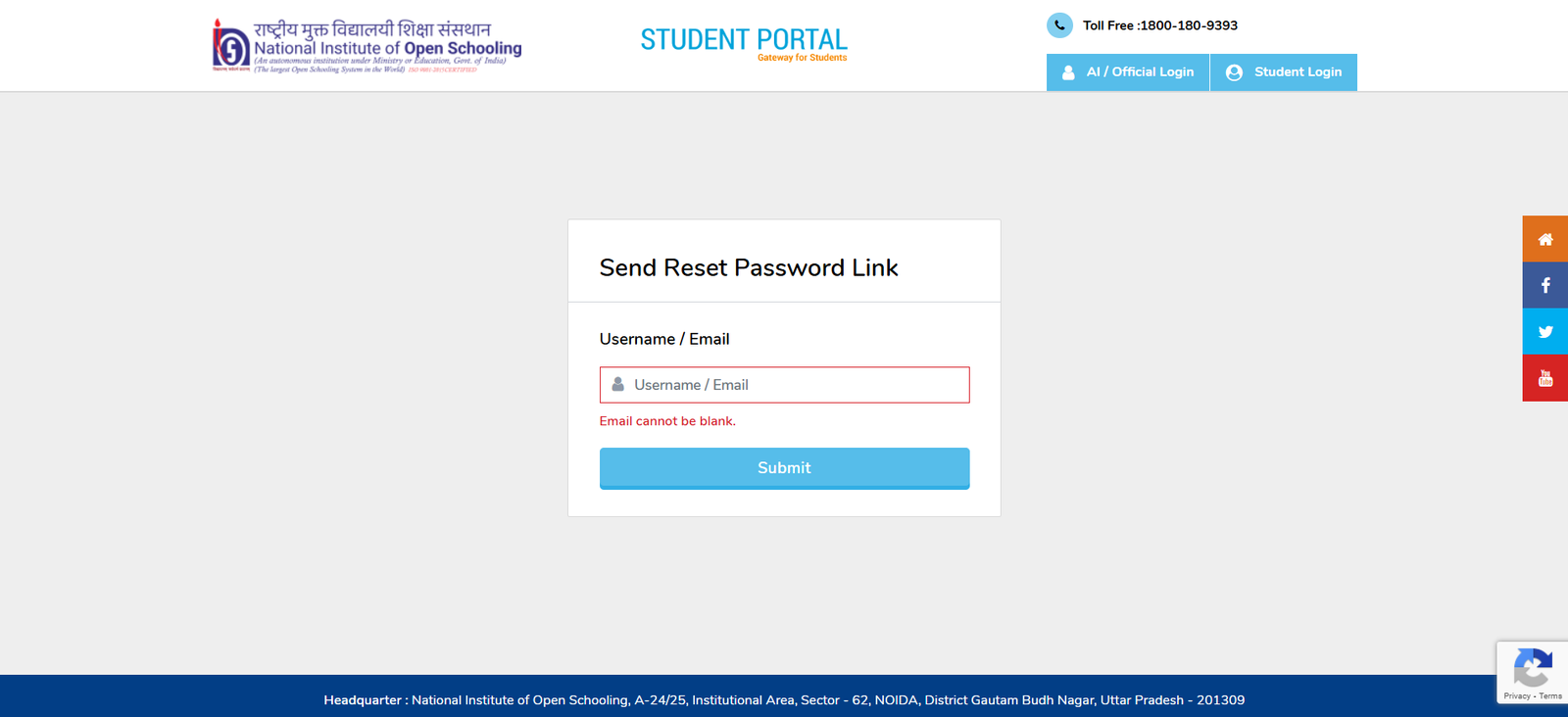
- Then, you have to enter the “Username/ Email” in the box.
- After that, you need to select the “Submit” button to get the reset link.
- Now, you have to select the link and reset your password.
- Please be sure to note down this NIOS login password for future reference.
Contact Info
If you face any technical issues while logging into your NIOS student account, then contact the customer service department.
Call At: 1800-180-9393 (Toll-Free)
Also Read:
FAQs
Ques. Is NIOS a better option than CBSE?
Ans. NIOS is known for its flexible curriculum and thus helps students pursue schooling in various circumstances. However, the CBSE curriculum is very structured and the atmosphere is competitive. However, the syllabus of NIOS is based on the NCERT guidelines only.
Ques. Is my NIOS 12th degree valid?
Ans. Yes, NIOS is an autonomous institution under the government of India and a NIOS 10th or 12th degree is equally valid like a degree from boards as CBSE, ICSE, and IB.
Ques. Is NIOS 12th difficult?
Ans. NIOS Curriculum is based on the NCERT guidelines, and the level of difficulty is similar to any other board. If you are a NIOS student, you study properly. Going by the previous trends, the average number of students passing from NIOS is quite higher when compared to other boards.
Ques. What facilities can be accessed from the NIOS login portal?
Ans. NIOS Students can access the list of web portals from the NIOS login portal. Apart from that, you can access notifications, a digital library, a course Video Gallery, Lab practical, student support services, and technical support.
Ques. How can I download the NIOS Hall ticket?
Ans. NIOS hall tickets can be downloaded from the official website of NIOS. To download the admit card/ hall ticket check the steps mentioned below:
- Visit the official website of NIOS at sdmis.nios.ac.in/auth
- Now, login using your NIOS login credentials.
- Navigate the page and select the NIOS Admit card.
- Click on it and save the Hall ticket for future use. Take a printout also.

He is a passionate blogger with 15 years of experience in creating engaging, SEO-friendly content. He loves sharing insights, tips, and stories that inform and inspire readers around the world